
I Built a Mobile App This Weekend (And You Can Too)
A perfectly reasonable way to spend a Saturday

You know that feeling when you have a perfectly good weekend ahead of you, and instead of touching grass, you decide to dive headfirst into mobile frameworks? No? Just me? Cool, cool.
Well, I did it anyway. Here’s what I learned while my coffee went cold.
The Mission
I wanted clear visibility on the mobile landscape. No hot takes. No Medium posts from 2019. Just hands-on experience with the actual options in 2025.
So I reviewed the stacks, ran some React Native tests, built a full Swift playground app, and put it on my actual phone. Simple stuff, but I had a blast diving into it.
The Landscape Check
Let me break down what’s actually out there:
React Native — Facebook (Meta) released this in 2015. The pitch: write JavaScript, ship iOS + Android. If you know React, you’re already 80% there. The ecosystem is massive. Expo makes it even easier with cloud builds and OTA updates. Hot reload is chef’s kiss.
Swift (iOS Native) — Apple’s baby, built in 2014 to replace Objective-C. SwiftUI makes UI work genuinely pleasant. The declarative syntax is elegant. Xcode previews are actual sorcery. You get native performance, native feel, and day-one access to iOS features. But you’re iOS-only (unless you also build for Android, but then... why are you here?).
Kotlin (Android Native) — Google’s answer to Swift, with official Android support from 2017. Jetpack Compose brought SwiftUI-like declarative UI to Android. Kotlin is a surprisingly delightful language. Material Design 3 out of the box. Coroutines make async actually make sense. But Gradle builds are where time goes to die.
Flutter — Google’s 2017 bet on “one code, literally everywhere.” Dart language, custom rendering engine (Skia). The UI is pixel-perfect across platforms because it literally draws its own widgets. You can ship to iOS, Android, web, macOS, Windows, Linux from one codebase. Everything’s a widget. Your screen? Widget. Your button? Widget. Your existential dread? Probably a widget.
My take: If I were building a mobile app today, I’d pick React Native if my team knows JavaScript and I want to move fast with a massive ecosystem. I’d pick Swift if I’m iOS-only and want the absolute best performance and platform feel. I’d pick Flutter if I need true cross-platform (including desktop/web) and want consistent UI everywhere.
For this weekend? I tested React Native, played around with it, then went deep on Swift. I wanted to get my hands dirty with native iOS and actually ship something to my phone.
Building the Playground
I wanted something clean and minimal to use as a foundation for future experiments. So I built a simple SwiftUI app with smooth animations and clean design.
SwiftUI’s declarative syntax just clicks. You describe what you want, and the framework handles the rest. @State for local state management, stacks for layout, .withAnimation for smooth transitions. It all flows once you learn the vocabulary.
Here’s what I ended up with: github.com/ThoBustos/swiftui-playground
A single-page app with elegant typography, subtle animations, and interactive elements. Nothing fancy, but it runs smoothly and gave me a solid foundation.
The best part? The whole thing is just clean, readable Swift. No magic, no hidden complexity. Just code that makes sense.
Getting It On My Phone (The Real Magic)
This is where it gets real. Once the app was running in the simulator, I wanted it on actual hardware.
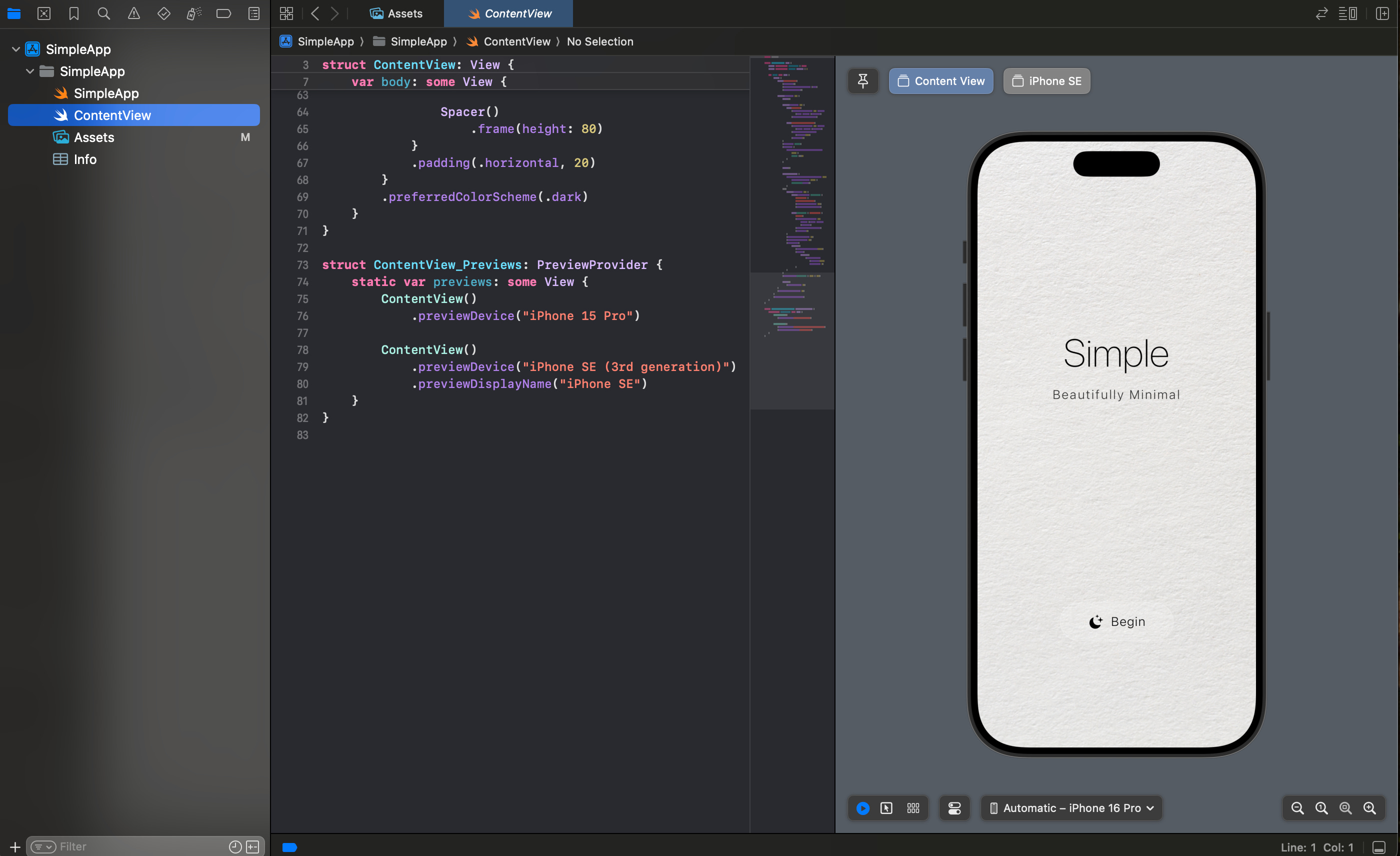
In Xcode, I created a build and set up my development team. Few things to know:
Enable Developer Mode on your iPhone: Settings → Privacy & Security → scroll to bottom → Developer Mode (turn it on). Restart your phone.
Approve the developer certificate: After restarting, go to Settings → VPN & Device Management and approve your developer profile.
Build: You can build from Xcode or directly from your phone. Either works.
That moment when you tap the app icon and see your code running on hardware you’re holding? Still hits different.
The Liquid Glass Button Dream (Coming Soon)
I wanted to end this weekend by building a super cool liquid glass button - you know, that iOS-style frosted, fluid effect that just looks premium. I had the Figma reference ready. I was ready. This was the ref btw:

Then I hit a wall: my Mac is running an older OS, which means I can’t get Xcode 26 (the version with the new liquid glass APIs).
So I need to update my Mac and that’s the next experiment to test recent version of xcode. Some liquid glass effects are available in older Xcode versions, but saw this repo for future ref: https://github.com/mertozseven/LiquidGlassSwiftUI .
Simple setback, but I had a blast diving into what’s possible. The button is coming. I want to experiment more with design overall.
The Real Takeaway
Shipping mobile apps isn’t hard. The frameworks change. The tooling evolves. But the core idea stays the same: write some code, build it, put it on a device, ship it.
React Native feels like home if you know JavaScript, but you’ll occasionally hit native module issues (and bridge). Swift feels powerful and elegant, but you’re locked to iOS. Kotlin feels modern, but Gradle will test your patience. Flutter feels ambitious and mostly delivers, but widget trees get deep.
There’s no “best” framework. The right choice depends on your team, your timeline, and what you’re building.
But here’s the truth: they’re all good now. Like, legitimately good. Mobile development in 2025 is kind of amazing, even when you’re choosing between four different ways to write the same app. And with a solid claude code, cursor (light mode pls), codex or amp nothing can’t stop you. Makes the learning curves less steeper.
You don’t need to be a mobile engineer. You don’t need a CS degree. You need a few hours and the willingness to just start.
I went from zero to a working app on my phone in one Saturday. So can you. (no backend here but I was playing with styles ahah). Pick FastAPI for your backend if your app uses ai/llms/agents. FastAPI is async-first, built on top of Starlette (for web) and Pydantic (for data validation). Which makes it very easy to setup validations and many api calls.
Now go build something.
What framework would you pick? Why? Any experiences/lessons learned with one of them? Drop a comment.